
This one turns up on almost every Prism Central deployment eventually: a warning alert saying disk space usage for /home/log/audit has exceeded 75%. It looks alarming — a full filesystem on the management plane is not something you want to ignore — but in most cases it’s routine housekeeping rather than a fault. The audit log has simply been rotating for months and nobody has cleared the archives.
Here’s what the alert means, how to confirm what’s actually consuming the space, and how to clear it safely. The figures below are from a real Prism Central VM I cleaned up recently.
What the alert is telling you
The alert comes from the Prism Central VM itself, not from a cluster:
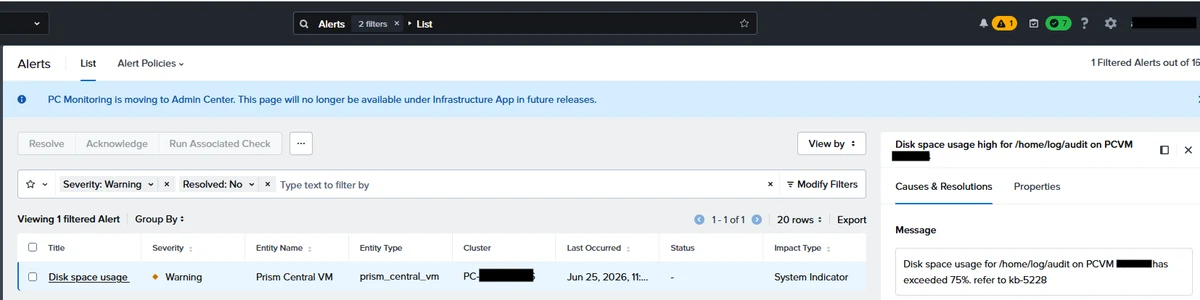
One thing that confuses people the first time: the alert names /home/log/audit, but when you go looking with df you’ll find the filesystem mounted at /var/log/audit. They’re the same storage — /var/log/audit is backed by a dedicated loop device that lives under /home. Don’t waste time hunting for two separate problems.
The threshold is 75%, and the partition is small — 378 MB on this PCVM. It doesn’t take much to trip it.
Step 1 — Look at what’s actually in there
SSH to the Prism Central VM and list the audit directory, oldest first:
nutanix@PCVM$ sudo ls -latr /home/log/auditOn this system that returned the active audit.log plus nine rotated archives, audit.log.1 through audit.log.9. Each archive was roughly 30 MB — auditd had been rotating at that size and keeping nine generations, so about 270 MB of the 378 MB partition was historical logs.
Step 2 — Confirm the filesystem usage
nutanix@PCVM$ df -h /var/log/auditBefore the cleanup this showed 294 MB used of 378 MB — 80% full, with only 76 MB free. That matches the alert, and it confirms the archives are the cause rather than something unexpected filling the partition.
This check matters. If df shows the partition full but the directory listing doesn’t account for the space, you have a different problem — a deleted file still held open by a process, most likely — and deleting archives won’t help you.
Step 3 — Remove the rotated archives
Once you’ve confirmed the archives are what’s filling the partition, remove them:
nutanix@PCVM$ rm -f /home/log/audit/audit.log.*Note the glob carefully. audit.log.* matches the numbered archives — audit.log.1, audit.log.2 and so on — but not the active audit.log itself. That’s deliberate: you don’t want to delete the file auditd currently has open, because removing it out from under the daemon leaves the space allocated until auditd is restarted, and you’d be no better off.
Step 4 — Confirm you’ve got the space back
nutanix@PCVM$ df -h /var/log/audit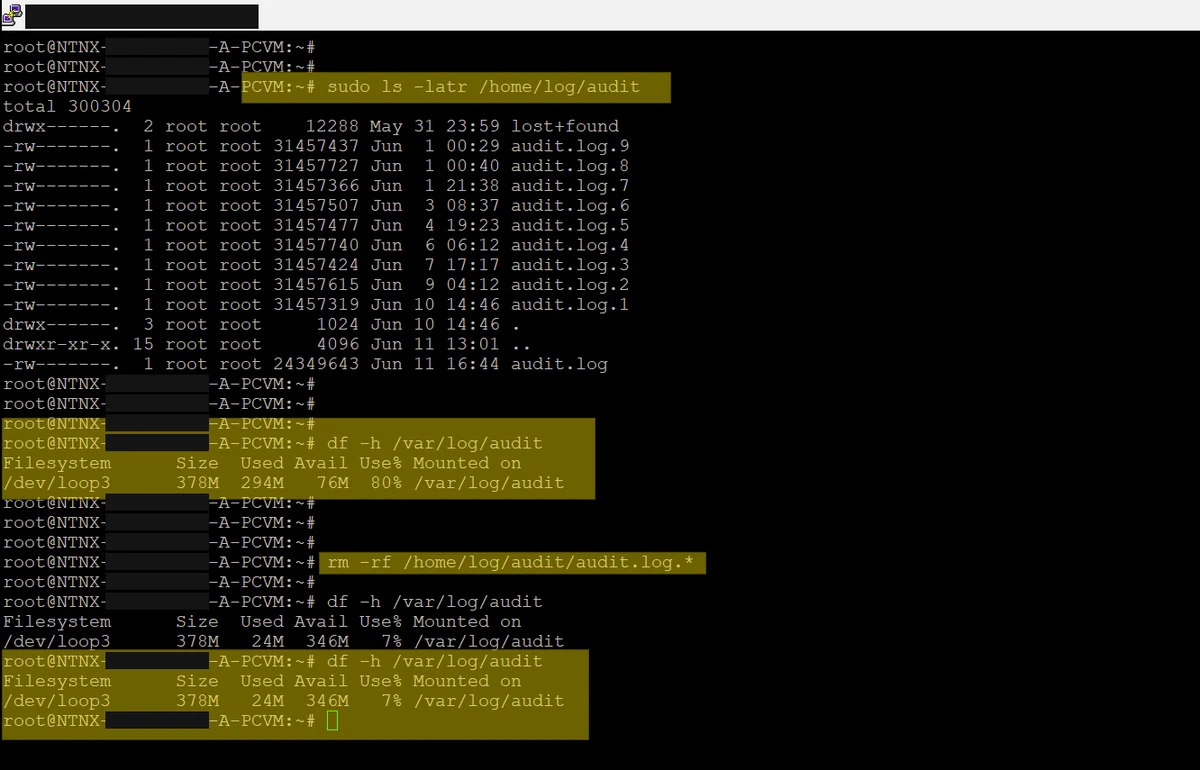
The result on this PCVM:
- Used space dropped from 294 MB to 24 MB.
- Utilisation dropped from 80% to 7%.
- Free space went from 76 MB to 346 MB of 378 MB.
The alert clears during the next NCC, either by running on PCVM using ssh “ncc health_checks run_all” or through the GUI.